Tool Setup and Configuration
Each OneVision tool takes you through the steps to train the model to identify features in the images. The workflow requires refining the model based on the results to achieve accurate predictions.
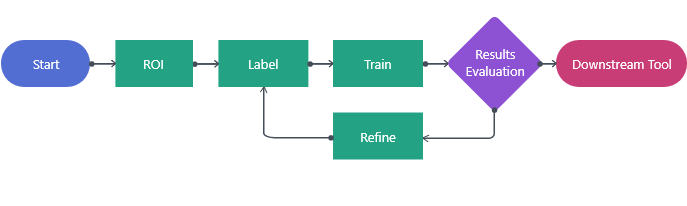
The following image and list describe the workflow for setting up a tool in a project In OneVision, a project is a collection of images and vision tools that performs different tasks, such as inspection, measurement, or identification.:
-
You can start the process in one of the following ways:
-
You add the first tool in a new project.
-
You add the tool as a downstream A downstream tool requires a previously configured upstream tool and its configuration as input. The tool is placed after its upstream tool in the toolchain. tool from the upstream An upstream tool comes first in the toolchain and its output defines a downstream tool. An upstream tool can have several downstream tools. tool. The upstream tool provides the current tool the views
-
-
Set the Region of Interest The Region of Interest (ROI) is the area of the image where the vision tool operates. (ROI The Region of Interest (ROI) is the area of the image where the vision tool operates.) to create Views The area of the image that the device operates on is called a view. A view can be the entire image, a user-defined rectangular area of the image, or the output of a tool, depending on the tool. from your images.
-
Label features or regions you want the tool to learn to identify in a set of images. Labeling Labeling is the process of marking features or defects in images, or categorizing the images into classes. Labeling is crucial for training Deep Learning Lite and Deep Learning Standard tools because the labels serve as training material to guide the tools how to function correctly. requirements and tools vary based on the tool.
-
Train the tool with the labeled images. The tool uses the labels to train a model. This step requires that the tool assigns train or test roles randomly to labeled images.
-
Process the images so the trained model can make predictions, then review the predictions and evaluate their accuracy.
-
The process step generates statistics and metrics data that you can use to fine tune and troubleshoot the tool behavior. If the predictions are inaccurate, go back to adjust the labels or training parameters.
-
Based on your application needs, you can add one or more downstream tools. The downstream tool receives the views from the upstream tool.